In the ideal world, we often consider memory that is large, fast, and cheap at the same time. But in the real world, this often is not the case due to resource limitations.
There are two types of memory technology:
- Dynamic RAM (DRAM): Memory that will lose data over time if we don’t refresh it, even if we’re connected to a power source. A refresh means that we need to read the data and write it back on a regular basis.
- Static Ram (SRAM): Memory that retains its data while power stays supplied.
Generally, SRAM is faster, but DRAM is cheaper (both in resource costs and area costs).
DRAM
Let’s first talk about how DRAM works.
DRAM Banks
To represent 1 bit, DRAM uses 1 transistor with an embedded capacitor, called a trench cell. The bit is encoded in the capacitor’s charge. These cells are composed in rows, which are aligned into 2D arrays called banks.
DRAM typically forms the physical main memory on our devices (our hard-drives), as it is cheap and dense.
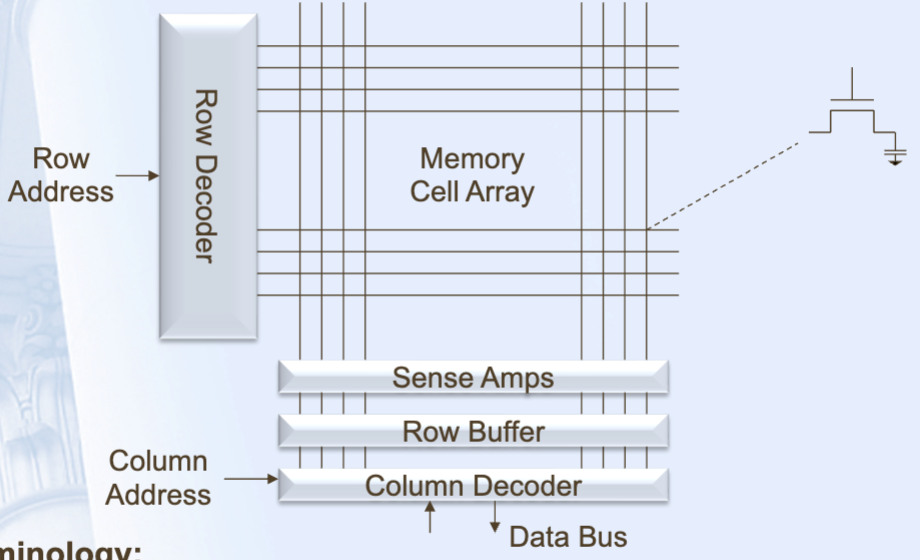
A bank will have a row buffer for read / write operations. This is a space that stores the most recently read row. Suppose we read / write from the bank with address <row, column>:
- Decode the row address (select the row)
- Use the sense amp to read the row, and get the bits
- Copy the bits to the row buffer
- Decode the column addresses with the column decoder
- Select the bits of the row buffer to read to the memory row (for modification / reading)
- (If writing) Modify the bits we want.
- Write the results back to the DRAM row.
(3) and (4) can be done concurrently.
Note that the write (7) needs needs to be done for both read and write. Because cells are made from capacitors, reads destroy the contents of the cells— thus, we need to rewrite the contents back to preserve the row for future reads.
Because the cells are capacitors, a bank will also need to occassionally read and rewrite cells, as they will slowly lose charge over time. This is known as a refresh.
Example: Refresh Example
Suppose our DRAM bank has 4096 rows, 2048 columns. It has a refresh period of 500us, and a read timing of:
- 4ns to select a row
- 10ns to read a bit value
- 2ns to put data in the row buffer
- 4ns to decode the columns
- 11ns to write data from the read values to the memory row.
How many data or non-refresh reads per second can this memory support?
- One read takes (3,4 can overlap). This gives us 40M reads a second.
- If a refresh takes 500us, then we need to perform 2000 refreshes a second on 4096 rows, giving us 8.192M refreshes a second.
- Our non-refresh reads are reads a second.
Fast Page Mode
Some DRAMS support Fast Page Mode. After every read / write, the row is kept open for the next operation. If the next operation’s row address is the same as the previous one, then we can reuse the contents of the row buffer!
This is similar to caching!
- If the row is closed, we need to:
- Pre-Charge: Close the previous row
- Activate: Open the new row by placing it in the row buffer
- Read/Write: Read or write the column desired from the row buffer
- If the row is open, we can just read / write from the row buffer!
Note that FPM relies on the fact that sequential memory addresses have the same row address, its performance heavily relies on the order of memory accesses.
Example: Fast Page Mode
Suppose we have DRAM organized as , and we make reads (cache misses) for
0xF00F00
0xE00F00
0xF00E04
0xE04F00
0xE00E00
0xF00123
0x123F00
Page Open (Activate): 10ns
Read from Row Buffer: 2ns
Page Close (Precharge): 5ns
Note that the top 12 bits are the row address, bottom 12 bits are the column address.
With FPM in-order, these memory accesses would take
This is because we have reads on 7 different rows, and opening, reading, closing them will take 17ns each.
However, if we have out-of-order FPM, we can group our addresses as follows:
0xE00E00
0xE00F00

0xF00123
0xF00F00
0xF00E04

0xE04F00

0x123F00
Reading now would give us
DRAM Memory Organization
So far, we’ve seen how banks work, which compose the actual memory that DRAMs store. Let’s see how banks are grouped together to form a single DRAM memory module.
- A group of banks is known as a chip. These can be seen as the black boxes on the memory module.
- A group of chips (typically 8) forms a rank, which are the chip groups on one side of the memory module.
- A group of ranks forms a DIMM (Dual In-Line Memory Module), a single memory module.
- A group of DIMMs forms a channel. A processor works with channels (sometimes, more than one if the processor has channel-level parallelism).
All of the channels together form the memory system that a processor works with.